Thursday, April 22, 2010

Optimizing Your AdWords Campaigns

Pay per click advertising is a form of marketing with major benefits. It differs from other methods of marketing in its ability to allow advertisers and marketers to measure and analyze the results of their techniques, to refine and optimize them to increase ROI beyond almost anything possible in the offline marketing world. Google AdWords is currently the prominent pay per click resource available today. Learning some of the ways to optimize your AdWords campaigns can cut costs while keeping conversions up in several ways.

Here are four ways to refine your AdWords campaign to see where money spent is producing the best return and to adjust settings to maximize return on investment.

1. The Segment option. This is one of the newest additions to AdWords. The Segment option is available within your Campaigns, Ad Groups and Keywords tabs. Within each, the options are different, but allow for viewing of your results in specific ways of measurement. This can include breaking into specific units of time, such as weeks or days of the week.

By viewing your data this way you can discover what weeks are most active for a seasonal market, as well as information such as which days of the week are most prone to getting better conversion rates. By knowing this data, you can reduce costs where your conversions are more expensive, increase bids where you are seeing better conversion rates, and in all these ways increase ROI.

2. A-B Split Testing for ads. This can be one of the most effective means of increasing CTR for your ad groups. Have two or three ads active for each ad group. After a number of clicks (ideally at least 20 clicks on each ad), choose the better performing ad. Replace the more poorly performing ad with a different ad copy. Repeat the whole operation to find which advertisement will produce the best CTR or the best conversion rate.

Doing this can often improve your CTR by a factor of 2 or more, and a higher CTR improves Quality Score as well as increasing lead generation. To get an accurate reading for proper A-B split testing, make sure your campaign setting for Ad Delivery->Rotation is set to “Rotate: Show ads more evenly”.

3. Remarketing with the Audiences tab. This is an element of AdWords that works only for the Content Network. When the Audiences tab is enabled, you can create remarketing lists to target specific visitors to your site. By placing code on specific pages within your site, a cookie is put on all users who visit these pages.

Then when they visit other sites with similar targeted themes, a very relevant ad is shown to these users to give them motivation to return to your site to make a purchase or opt-in. This works by reaching out to visitors who had visited your site previously and displayed some kind of interest in that market. Often this remarketing approach can increase conversions by contacting people who have an established interest in your products and reconnecting with them.

4. Changing advertising frequency/rate settings. Advertising can be adjusted in AdWords to not just advertise for certain days and hours of each day, but the amount for CPC can be adjusted to raise or lower bidding rates for certain days and hours. The setting is within each Campaign settings area, under Advanced settings->Schedule and choosing Ad Scheduling, the selecting “Bid Adjustment” inside the scheduling option.

After doing research for performance for specific days within your campaign you can make changes to cut costs and increase ROI nicely. For example, after viewing that you are getting little or no conversions on certain days of the week, you can pause these days with this setting. In the same way, any days that have better conversion rates can have an increased bid amount to maximize CTR for those days. This can all help improve business results for your AdWords campaign.

By knowing about and using these different options within AdWords you can greatly improve your pay per click results. AdWords optimization is a definite way to increase ROI and open additional opportunities to expand your marketing methods. Properly using these techniques can cut costs, increase profits, and help you make the most out of this powerful tool.

Written By: Search Engine Journal

Wednesday, April 21, 2010

Poll: What is The Pagerank OF Your Website/Blog?

Poll: What is The Pagerank OF Your Website/Blog?

WordStream Does it Again: New Awesome Keyword Utility for SEOs (paid)

WordStream Keyword Management for SEO is a keyword research tool targeted to SEOs (as you may know, they previously specialized in PPC keyword research and are now extending their service to SEO needs).

It offers the same keyword suggestion capabilities as Wordtracker, Keyword Discovery, and similar tools, but layers on keyword analytics, keyword grouping and organization, and integrated content authoring tools for roughly the same price (starting at $49/month) you’d expect to pay for traditional keyword research tools.

Here are the features that are advertised:

  • Keyword suggestions;
  • Related keywords;
  • Keyword trend data;
  • Real-time keyword analysis;
  • Conversion tracking and keywords;
  • Keyword organization tools;
  • Workflow prioritization;
  • Information architecture suggestion;
  • Integrated content authoring tools.

Keyword discovery interface includes basic keyword suggestion tool, competitive research, web server log files upload, or external data analysis:

discover-keywords-tab.gif

From there you can organize your data into a taxonomy of tightly related groups and sub-groups; this resulting keyword structure is incredibly useful for creating SEO strategy, setting content creation priorities and even planning your site’s information architecture. The software suggests potential keyword groups which you can review and create with the click of a button.

organize-keywords-tab.gif

So looks very interesting – really no excuse for not trying out considering there’s a free trial version! Let me know your thoughts!

Tuesday, April 20, 2010

Soovle: Have Fun with Your Keywords

When you are looking for something on the WWW and you have a clear representation of what it is, you can find it in a matter of seconds via any of the countless search tools available. And now, if you have absolutely no idea about what you would like to find there is a search engine that will sort you out.
This particular search tool goes by the name of Soovle, and its implementation is as follows. In principle, you start keying in a term and a few characters into the process different lists of terms that might have something to do with the concept crop up. These lists give out Google, Yahoo, Amazon and Wikipedia recommendations that you can click upon straight away in order to see the information unfold.
Some options for accommodating the search process to your needs include the ability to specify that one of the abovementioned engines be the default one, as well as enabling you to save the suggestions that were produced for ulterior reference.

At the end of the day, I think it is always nice to have as many options as possible when it comes to looking up information on the WWW. As such, any new solution that comes along is always welcome.


Soovle is a customizable engine that unites the suggestion services from all the major providers in one place: Google, Bing, Amazon, Answers.com, Yahoo, Wikipedia, Youtube. I found the tool to be a major help for search and content creation inspiration.

Various ways to play with it:

  1. Type a search term and press enter (or click “Soovle”).
  2. Look through the suggestions and click any of them;
  3. You will see the results quickly updated based on the new phrase you just clicked.
  4. You can repeat steps 1-3 as many times as you want!

Soovle

Some other tricks you need to know:

1. Soovled Link is the first search result that is likely to be returned if you execute the search. It is fun to use for associations (Based on the currently active search engine. The currently active search engine is the one between brackets (see the screenshot above));

2. You can move the engines around by use the right arrow key or click on the icon, found below the search box, of the desired engine.

3. Double click a suggestion to perform the search on the engine it came from OR drag a suggestion onto the small icon (below the search box) of an engine you’d like to execute the search (warning: search results will open in the samewindow, so your play may be interrupted).

Use Saved Suggestions:

“Saved Suggestions” stands for a not-so-obvious option that allows to save phrases while you play.

Use the mouse to drag any suggestion onto the book image at the upper left of the screen. You can use your saved suggestions in a number of ways:

  • To search again in the future. To do so, click on the saved suggestion (this fills the search box), and press enter.
  • To print your saved suggestions as a list. To do this click the printer icon below the list of terms. Or you can save them to a file for manipulation by a desktop application. To do this click on the icon with the downward-arrow on it – this icon is at the left of the graph
  • To research the saved suggestions using Google trends: click on the graph icon to try this out (the search will open in a new tab). Multiple phrases will be separated by commas and thus compared at Google trends.

See: the following:

Saved suggestions

Will start this search:

Google trends search

Check the top internet keywords…

This list is the most used search suggestions provided by the major service providers and is organized by each letter of the alphabet.

You can see them by clicking TOP icon in the top right corner of your screen.

The top list is compiled nightly by querying each of the completion services of the major providers. Each provider’s result is treated as a vote. The votes are tallied and the terms are ordered, within a letter-set, by the number of votes that query received.

Top Internet keywords

From -

Ann Smarty

Monday, April 19, 2010

Increasing choice and relevancy in search ads

Increasing choice and relevancy in search ads

As part of our ongoing commitment to helping users find the information they're seeking online, we’re happy to announce the launch of Ad Sitelinks.

Ad Sitelinks is a new AdWords feature that allows you to extend the value of your existing AdWords ads by providing additional links to content deep within your sites. Rather than sending all users to the same landing page, Ad Sitelinks will display up to 4 additional Destination URLs on your search-based text ad for users to choose from. By providing users with more options, you can create richer, more relevant ads that improve the value of your brand terms and other targeted keywords.

With Ad Sitelinks, you can point to specific information on your site such as gift registries, special deals, holiday or event-related promotions, and store locators. Early participants in Ad Sitelinks, like Priceline.com, found that presenting multiple link options made it easier to direct users to relevant information on their sites, driving them deeper into the conversion funnel.

Currently, the option to set up Ad Sitelinks will only appear for advertisers whose ads meet a certain high quality threshold.

If your account qualifies to run this feature, you'll find the option to set up Ad Sitelinks in your Campaign Settings tab -- it will appear as "Show additional links to my site" under the "Ad extensions" section.

Wednesday, April 14, 2010

Google Officially Counts Site Speed for Web Search Ranking

Google Officially Counts Site Speed for Web Search Ranking

Google has just officially announced that website speed is now a new signal when it considers web search ranking. Although not too much weight is given to site speed, still Google encourages website owners to consider implementing site speed booster to make their websites rank higher on Google search. This however applies only to Google.com. And site speed is defined by Google as the speed by which websites respond to web requests.


Google also gave two major reasons why site speed is important – it improves user experience and satisfaction when visiting websites and it reduces operating costs.

In determining site speed of a websites it ranks, Google uses various methods and sources. What are those specifically remains secret though.

To evaluate the speed of your site, you can use the following tools, as suggested by the Google Webmaster Central Blog:

  • Page Speed, an open source Firefox/Firebug add-on that evaluates the performance of web pages and gives suggestions for improvement.
  • YSlow, a free tool from Yahoo! that suggests ways to improve website speed.
  • WebPagetest shows a waterfall view of your pages’ load performance plus an optimization checklist.
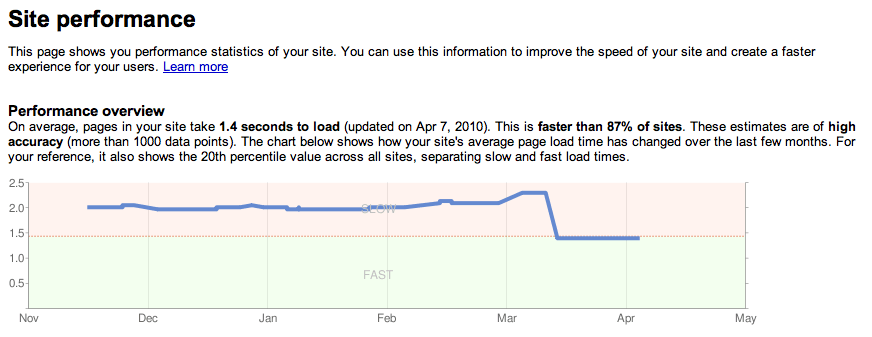
  • In Webmaster Tools, Labs > Site Performance shows the speed of your website as experienced by users around the world as in the chart below. We’ve also blogged about site performance.

Written By:

Arnold Zafra

Why big brands need SEO

It’s true: A lot of big brands think that they don’t need SEO.

Now, before you go off giggling into the wilderness, it isn’t that big brands don’t know that SEO exists. In fact, they have what *seems* to be a valid logical reason for thinking they don’t need it. Their reasoning goes like this:

If we aren’t monetizing search traffic to our site through eCommerce or banner ads, then it doesn’t make any sense to pay someone to help bring traffic to the site. And in any event, everybody already knows our site exists — even if they’ve never been to it. They’ll find us if they’re looking for us.

It sounds solid on the surface, right? I mean, you can see how some people would be persuaded by such an argument. And in many cases, yes, everybody *does* know your site exists, even if they’ve never been to it (for instance, I’m absolutely certain that Wawa has a site, though I have never been there).

What’s wrong with their logic?

What these guys don’t understand is that SEO is not just about traffic numbers, and in some instances, it has almost nothing at all to do with traffic at all.

So what I’m going to do for the remainder of this post is take a look at one big brand’s web presence and explain how SEO would seriously help their marketing efforts.

Serial SEO Neglecter: McDonald’s

I’m going to use McDonald’s as an example here, because I don’t think there’s a more perfect brand in the world I could use to illustrate my point. This is why:

1. Everybody is familiar with the McDonald’s brand. You know they have a website, even if you’ve never been there.

2. Their website is about as optimized for SEO as a koala’s fart.

3. ROI on SEO efforts would be difficult to measure, as McDonald’s isn’t directly monetizing their traffic in any way at all. And they shouldn’t, of course, as that isn’t the function of their site. But any decently good marketer knows that not everything worth doing has an easily measurable ROI.

by Poonam Bhatt on April 6, 2010