Showing posts with label seo tips. Show all posts

Friday, May 21, 2010

Factoring Time into SEO

We all know that it takes time for your rankings in the SERPs to change. Although they do fluctuate frequently, long-term improvements in your SERPs rankings take time to produce.

Some time needs to pass before the Search Engines are confident you deserve increased rankings. Things that can happen during the days, weeks or months before you see some real results include:

  • Increase in aggregate traffic – if more unique visitors are landing on your website, then that means there’s a bigger trend of searchers looking for you, therefore your website is more relevant, so the more traffic you have, the more you’re seen as authoritative
  • Increase in links pointing to external pages linking to you – this has a snowball effect because you receive more link juice from one link linking to you when other websites are linking to the page that’s linking to you.
  • Increase in the amount of clicks from searchers – search engines have a general idea of the percentage of clicks the #1 position for a keyword should get (i.e. the #1 result should be getting 40% of clicks, while #2 should get 20% – arbitrary numbers), so when there’s an imbalance of clicks (if the #2 result starts getting 40% of clicks while the #1 result receives 20%), the results in the SERPs are re-ordered (the #2 result would be bumped up to #1 to see if it can maintain the 40% of clicks it has been receiving)
  • Increase in age of domain – as your domain ages, and you continue to renew your domain for at least a few years until expiration, your website’s authoritativeness increases because it’s an older source of information.
  • Increase in age of backlinks – as the age of the backlinks pointing to you increase, search engines believe that your website is more authoritative because the links serve as past proof that your website is worth checking out. While search engines love fresh content, they also highly respect older content

Monday, May 3, 2010

Enhance Google Adwords Tool with Keyword Tool Supercharger

Keyword Tool Supercharger is a great tool developed by GeekLad. It means to provide more competition and keyword analysis data for a widely-used free keyword research tool – Google Adwords Tool.

It can be installed as Google Chrome Extension or as a browser bookmarklet –KWT Supercharger (FireFox: just drag it to your browser bookmarks toolbar).

Now give it a try!

Run a keyword suggestions search at Google Adwords Tool and click the bookmarklet. The first thing you’ll notice is an extra options box added to the regular Adwords tool interface.

The box contains the following options:

Keyword tool supercharger

The box allows to filter the search terms in various ways you may (and will!) find useful:

  • Desired Daily Volume: The number of daily searches for the keywords. Higher is better.
  • Desired Competition: The number of websites containing the keywords. Lower is better.
  • Desired Supply/Demand Ratio: The # of competing sites/# of daily searches. Lower is better, a ratio less than 1 is ideal.
  • Required words (comma or space separated): Words/phrases you wish to see appear within the results. These need to be separated by commas. You can also prefix a word/phrase with a minus (-) to specify words you do not want to appear in the results.
  • Exact search: Whether or not you want the competition data to be based on searches of the exact phrase (the keyword phrases are searched with quotes). By default, this is enabled.
  • Filter on SEO Criteria: When you click this, only rows that match the criteria above will be displayed.
  • Show All/Update Display: This will display all results (including those that do not match the criteria above).
  • Reload Competition Data: This will reset and reload all of the competition data. This may be necessary if you’ve selected a new choice for the Exact search option.

While this all seems pretty straightforward, let’s look into some of the options in more detail:

Search within your keyword list

Or, in other words, filter your keyword list by one (or more) term you want to see in the key phrase.

For example, first run the keyword search for [diabetic] and then filter the list by two words [diet] and [diets]. You thus see a clean keyword list containing your core term [diabetic] and the extra word you are currently interested in [diet(s)]:

Search within your keyword list

Get an idea of the “supply”

While the “search volume” data gives you an idea of each key term “demand”, the tool offers a way to research the supply: by default, it uses Bing API to check how many search results each term will generate if you search Bing for the exact match. Bing data may seem not exactly reliable but it can be used to compare.

The tool also breaks down monthly searches by average daily search, and then builds a supply/demand ratio based on the daily searches divided by the total number of results for the keyword:

Daily search volume / total number of search results = supply/demand ratio

(The lower the ratio, the better the odds you’ll receive some organic traffic if you use those keywords on your page.)

The additional keyword analysis data is provided in three new columns in the display:

Keyword tool supercharger

You can also query Google search results numbers but, unlike with Bing, you won’t be able to do that in bulk. Instead, you’ll have to click each Bing number for the tool to query and return Google result number. The supply/demand ratio will also be re-calculated once you query Google:

Keyword tool supercharger

A few things I’d like to be added to the tool:

  • The sorting option for the added columns;
  • The ability to enable competition query for the filtered-by-the-keyword list (currently, when I filter the list by a keyword and then push “Reload Competition Data”, the keyword filter seems to get disabled)

All in all, I found the tool very usable and useful. You may want to give it a try and let me know what you think!

From SEJ

Thursday, April 29, 2010

Google Starts Displaying Pages Similar to Search Results

Google has just launched a new search feature that aims to help you easily find new websites that are similar to the ones you are familiar with and are related to the subject that interest you, particularly for your current search session.

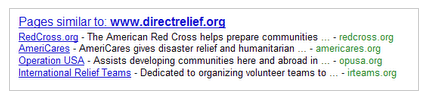
The new feature called “Pages similar ” makes the Google search feature “similar” more prominent and visible on your search results. You can find a box just below the search results page containing list of links that point to, well pages that are similar to the current search results that Google has yielded for your search terms.

The links listed on this Pages similar box are alternative sites that you won’t normally check they don’t directly answer your search query but then again the site may contain contents that would otherwise be useful to your current search.

Google gave the following example illustrating Google’s Pages Similar to feature.

For example, with the recent earthquakes around the world, many of us have been looking for international relief organizations. We knew that Direct Relief International has been actively involved in Haiti, so we started off by searching for [direct relief international]. The first result on the page linked us to the Direct Relief website, where we found many ways to help in Haiti. But what if one wants to support several organizations? If you click the “Similar” link that’s on the same line as the “www.directrelief.org/” URL, you’ll find other nonprofits that are also involved in relief efforts.

We’ve offered a “Similar” feature on results for a while now as a way to discover new, useful sites, but it hasn’t been too visible. Since we’ve been continuously improving this feature and we think it’s really useful, we’re now going to start showing these alternative sites more prominently. Starting this week, for queries where similar sites are likely to be helpful, we’ll display a list of “Pages similar” at the bottom of the results page. For example, this is the list of sites similar to Direct Relief International: