Showing posts with label seo keyword. Show all posts

Thursday, May 13, 2010

Why SEO is like The Biggest Loser

Few television shows are as close to a one-to-one comparison to Search Engine Optimization like The Biggest Loser. From the personal trainers to the eliminations to the goal of the show, trimming down an SEO site is eerily similar to the weekly weight-loss programming seen frequently on NBC.

Every contestant is obese. When a SEO is first contacted by an internet business, whether to join the In-House team or as an outside consultant, it is very rare that the website they start work on is doing well at all. Almost certainly, the website will be fat, out of shape, and will require work, whether through link building (working out), or on-site optimization (diet and lifestyle). If things were working out great and the person had great control of their site or their SEO services, they wouldn’t be contacting you, the personal trainer.

The process takes a long time. SEO is not a quick fix. While we can make some quick, immediate changes to a website (diet and lifestyle), it takes long term commitment to link building (exercise) and maintenance of the website to get to our ideal image, which is a front page rankings. Hopefully, these front page rankings will convert traffic into customers (dates!).

Every person requires a different trainer style. Every client and company is different. Some clients will require ninety e-mails and countless phone-calls to finally change their title tags (dietary habits), while others will do so instantaneously. Some of these clients will like you a little too much and start calling you even when you shouldn’t be working. This happened to Bob Harper in Season 8 with Amanda – I know, I thought it was a little weird too.

Tuesday, May 11, 2010

Why Google’s Redesign Could Be Good News for Social Marketers

It’s all about the real estate. Google results pages have historically been about simplicity. Any search “options” have been such a little part of the UI that, let’s be honest, hardly anyone knew they were there.

Before now, Google attempted to predict what users wanted by including universal search (such as news, videos, and images) right in the organic results. Most recently, social conversations (blog posts, twitter updates, etc.) have made their way into the SERPS. Today, a clear left navigation gives users quick access to specific vertical search features right from the results pages:

While universal search results had created added opportunities for search marketers to capitalize on SERPs, this latest change favors social marketers. In addition to video, images, maps, and news search; blogs, Forums (Discussions), and Twitter/Buzz like services (Updates) have been given their respective real estate from Google results pages. So if you’re not already involved in these as a part of your internet marketing strategy, you’ve just fallen further behind.

Blogs

While Google blog search is nothing new, this new navigation is sure to generate some increased usage. If you own, run, or write for a blog, that could mean an increase in traffic from Google. If you don’t, it’s probably time you started one…

Freshness of content will also be a consideration for users. While the results are set to sort by “relevance” by default, buttons to sort by date, and/or limit results to the last 10 minutes, hour, day, week, month, and year are easily accessible. The default results, too, even seem to favor the fresh content and include information on how old the post is within the SERP listing. What does this mean for you? Keep blogging…as often as you can.

Updates – Twitter & Google Buzz Search

In December, Google released their “real time search” feature. Tweets were included within results and a full page of real-time tweets was just a click away. Last month, Google added a dynamic archive function which gave users the ability look back at specific days & times or track twitter trends across an entire year. Now, Google has given this search feature a place in their new navigation.

For marketers and content producers, the “Top Links” section of the results is just one more opportunity to spread content by promoting it on Twitter and Google Buzz. While the potential for consistent traffic may not be as appealing as the blog search section, it’s certainly another good reason to make services like twitter and Google Buzz a part of your social media strategy. And if nothing else, it makes for a great tool for ORM or tracking and monitoring social campaigns within the twittersphere.

Discussions – Forum Search

Who says forums are dead? “Discussions” is the final social addition to the new Google navigation and it focuses on forums and answer services like Wiki Answers and Yahoo! Answers. It’s quite useful to users who may be looking for solutions to questions that others might have already posted online. Much like Blog search it’s not a completely new service, but again, this change will likely mean increased usage. So if you own, run, or moderate a forum, this could translate into increased traffic and thus additional activity.

For the rest of social marketers, however, it means allocating more time to participating in industry forums as a part of their social media strategy. Being active within forums and providing answers to common industry related questions on services like Yahoo! Answers can give an individual or brand extra exposure and more importantly: credibility & authority.

Bad news for SEOs?

The down side to Google’s new navigation could be reduced use of the general results. With these extra options easily accessible for users to refine their search, Google has essentially marginalized their search algorithm. The effect could be reduced clicks which could drive traffic down for sites that typically do well in organic results. But as search & social media continue to blend into small parts of a larger entity; marketing strategies will need to adjust. And this change by Google is just one more example.

Friday, May 7, 2010

PPC Magic: 3 Steps To Turning Hundreds Of Keywords Into Millions

Basically, the long tail approach dictates that we not only use high-search volume, general terms, but also load up our accounts with many, many niche terms—the theory being that these tail terms are cheaper due to less competition and also more relevant so they drive higher engagement with users.

I’ve seen campaigns with a few hundred terms perform very well. I’ve also seen campaigns with millions of terms perform poorly. Remember, we test everything in search engine marketing! So, other than the actual logistics of managing a huge list, there really isn’t any drawback to adding and testing many keywords if you think they even have the slightest chance of providing value to your advertiser. I’m going to go out on a limb here and say that for beginners to PPC, try to limit your lists to 10,000 to 20,000 max.

The key is using modifiers

So, how do we take the hundreds of terms we uncovered during our research and turn them into tens of thousands (and maybe even millions) of long tail terms? The secret is with modifiers. For example, if you’re selling used cars, you may take a core term like used car and add buying modifiers so now you have purchase used car, buy used car, shop for used car, etc. As search marketers looking for tail terms, we may combine our core words with multiple modifier lists. For example, if we matched up every term with the dealer’s car brands, we wouldn’t have just purchase used car, but alsopurchase used Saturn, purchase used Ford, purchase used Toyota etc.

Each advertiser will have their own set of modifiers that make sense. However, some common modifier directions include:

Buying cycle. Used for awareness/interest terms, modifiers such as info onor research could be used. For users further down the funnel, buy, shop, purchase and so on also make sense.

Adjectives. If you’re selling broadband service, then description words likefast, speedy, and quick could be important. For banks, it might be performance words such as high yield or safety-conscious words like insured.

Geographical. Lists of cities, towns, states, DMAs, metro areas, etc. If the advertiser is a U.S. based national brand, you may almost always use states and top DMAs as modifiers. Certainly car insurance Omaha should be treated differently than car insurance New York City. Similar geographical modifiers can be used elsewhere in the world.

Here are three steps to using modifiers to build giant keyword lists.

Step #1 – Identify your core terms. If you’ve been through all of the research ideas in this column, you will have already compiled a pretty comprehensive list of keywords from keyword tools, competitor research, and so on. So, you should be able to look through all of the terms and quickly pull out a high level list of core terms. If you’re an online retailer, maybe those core terms are your main categories. Or, if you’re a service company, you will probably have a handful of terms that are used most when people search for your company.

As an example, I’ll use a clothing retailer based in the western region of the U.S. Here is their core term list. Make sure to include plurals and any very common misspellings in the core list.

  • T-shirt
  • T-shirts
  • Jeans
  • Shirt
  • Shirts
  • Dress
  • Dresses

Step #2 – Generate your modifier lists. 5 lists that come to mind for this retailer are:

Sizes: Small, Medium, Large, XL, XXL
Color: Red, Blue, Green, Yellow, Brown, White, Black, Orange
Purchase terms: Buy, Shop, Browse, Purchase, Deal, Cheap, Inexpensive,
Qualifiers: Brand name, Designer, Name Brand, Quality, Chic
Western States: California, Arizona, New Mexico, Nevada, Oregon, Washington, Colorado, Montana

Step #3 – Generate permutations. You can use a permutation tool such as Keyword Lizard or Keyword Combinations to input your various lists. You’re always going to want to use your core terms in combination with modifiers where it makes sense. Here’s a screenshot from the free Keyword Combination tool:

Suddenly, you have tail term lists with designer jeans California, small blue shirt, and inexpensive XL t-shirts. In fact, from your seven core terms and five simple modifier lists, you can easily generate over 200,000 keywords.

Okay, here’s where the magic happens. Check the math: 7 Core Terms X 5 sizes X 8 colors X 7 purchase words X 5 qualifiers X 8 States = 78,400 variations of your core words.

Abracadabra!

Actually, you have more than that. There are keywords that won’t contain every list. So you really add one more modifier per list that is a “blank space”. Once you do that, you get 186,624. Wow! In fact, if you were to add just one more keyword to one of those lists, the total available permutations would be 207,360! You won’t use all of those keywords, especially if you cap them at 3-4 words per keyword phrase. However, chances are you’ll be using many more modifier lists and core terms so the list could grow to millions very easily. Ultimately, you certainly will have plenty of great tail terms to test.

And, if you do it right, you can easily segment the keywords into groups and campaigns. For this example, there could be a “sizes campaign” or a “states campaign.” That way you can address similar words with the most relevant ad text and landing pages. Next week, we’ll dive deeper into campaign and ad group segmentation.

Thursday, April 29, 2010

Google Starts Displaying Pages Similar to Search Results

Google has just launched a new search feature that aims to help you easily find new websites that are similar to the ones you are familiar with and are related to the subject that interest you, particularly for your current search session.

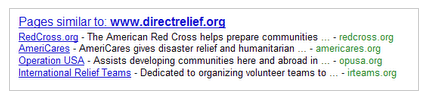
The new feature called “Pages similar ” makes the Google search feature “similar” more prominent and visible on your search results. You can find a box just below the search results page containing list of links that point to, well pages that are similar to the current search results that Google has yielded for your search terms.

The links listed on this Pages similar box are alternative sites that you won’t normally check they don’t directly answer your search query but then again the site may contain contents that would otherwise be useful to your current search.

Google gave the following example illustrating Google’s Pages Similar to feature.

For example, with the recent earthquakes around the world, many of us have been looking for international relief organizations. We knew that Direct Relief International has been actively involved in Haiti, so we started off by searching for [direct relief international]. The first result on the page linked us to the Direct Relief website, where we found many ways to help in Haiti. But what if one wants to support several organizations? If you click the “Similar” link that’s on the same line as the “www.directrelief.org/” URL, you’ll find other nonprofits that are also involved in relief efforts.

We’ve offered a “Similar” feature on results for a while now as a way to discover new, useful sites, but it hasn’t been too visible. Since we’ve been continuously improving this feature and we think it’s really useful, we’re now going to start showing these alternative sites more prominently. Starting this week, for queries where similar sites are likely to be helpful, we’ll display a list of “Pages similar” at the bottom of the results page. For example, this is the list of sites similar to Direct Relief International: