Showing posts with label seo training. Show all posts

Tuesday, May 11, 2010

Why Google’s Redesign Could Be Good News for Social Marketers

It’s all about the real estate. Google results pages have historically been about simplicity. Any search “options” have been such a little part of the UI that, let’s be honest, hardly anyone knew they were there.

Before now, Google attempted to predict what users wanted by including universal search (such as news, videos, and images) right in the organic results. Most recently, social conversations (blog posts, twitter updates, etc.) have made their way into the SERPS. Today, a clear left navigation gives users quick access to specific vertical search features right from the results pages:

While universal search results had created added opportunities for search marketers to capitalize on SERPs, this latest change favors social marketers. In addition to video, images, maps, and news search; blogs, Forums (Discussions), and Twitter/Buzz like services (Updates) have been given their respective real estate from Google results pages. So if you’re not already involved in these as a part of your internet marketing strategy, you’ve just fallen further behind.

Blogs

While Google blog search is nothing new, this new navigation is sure to generate some increased usage. If you own, run, or write for a blog, that could mean an increase in traffic from Google. If you don’t, it’s probably time you started one…

Freshness of content will also be a consideration for users. While the results are set to sort by “relevance” by default, buttons to sort by date, and/or limit results to the last 10 minutes, hour, day, week, month, and year are easily accessible. The default results, too, even seem to favor the fresh content and include information on how old the post is within the SERP listing. What does this mean for you? Keep blogging…as often as you can.

Updates – Twitter & Google Buzz Search

In December, Google released their “real time search” feature. Tweets were included within results and a full page of real-time tweets was just a click away. Last month, Google added a dynamic archive function which gave users the ability look back at specific days & times or track twitter trends across an entire year. Now, Google has given this search feature a place in their new navigation.

For marketers and content producers, the “Top Links” section of the results is just one more opportunity to spread content by promoting it on Twitter and Google Buzz. While the potential for consistent traffic may not be as appealing as the blog search section, it’s certainly another good reason to make services like twitter and Google Buzz a part of your social media strategy. And if nothing else, it makes for a great tool for ORM or tracking and monitoring social campaigns within the twittersphere.

Discussions – Forum Search

Who says forums are dead? “Discussions” is the final social addition to the new Google navigation and it focuses on forums and answer services like Wiki Answers and Yahoo! Answers. It’s quite useful to users who may be looking for solutions to questions that others might have already posted online. Much like Blog search it’s not a completely new service, but again, this change will likely mean increased usage. So if you own, run, or moderate a forum, this could translate into increased traffic and thus additional activity.

For the rest of social marketers, however, it means allocating more time to participating in industry forums as a part of their social media strategy. Being active within forums and providing answers to common industry related questions on services like Yahoo! Answers can give an individual or brand extra exposure and more importantly: credibility & authority.

Bad news for SEOs?

The down side to Google’s new navigation could be reduced use of the general results. With these extra options easily accessible for users to refine their search, Google has essentially marginalized their search algorithm. The effect could be reduced clicks which could drive traffic down for sites that typically do well in organic results. But as search & social media continue to blend into small parts of a larger entity; marketing strategies will need to adjust. And this change by Google is just one more example.

Tuesday, May 4, 2010

55 Quick Search Engine Optimization Tips

Everyone loves a good tip, right? Here are 55 quick tips for search engine optimization. Most folks with some web design and beginner SEO knowledge should be able to take these to the bank without any problem.

1. If you absolutely MUST use Java script drop down menus, image maps or image links, be sure to put text links somewhere on the page for the spiders to follow.

2. Content is king, so be sure to have good, well-written and unique content that will focus on your primary keyword or keyword phrase.

3. If content is king, then links are queen. Build a network of quality backlinks using your keyword phrase as the link. Remember, if there is no good, logical reason for that site to link to you, you don’t want the link.

4. Don’t be obsessed with PageRank. It is just one isty bitsy part of the ranking algorithm. A site with lower PR can actually outrank one with a higher PR.

5. Be sure you have a unique, keyword focused Title tag on every page of your site. And, if you MUST have the name of your company in it, put it at the end. Unless you are a major brand name that is a household name, your business name will probably get few searches.

6. Fresh content can help improve your rankings. Add new, useful content to your pages on a regular basis. Content freshness adds relevancy to your site in the eyes of the search engines.

7. Be sure links to your site and within your site use your keyword phrase. In other words, if your target is “blue widgets” then link to “blue widgets” instead of a “Click here” link.

8. Focus on search phrases, not single keywords, and put your location in your text (“our Palm Springs store” not “our store”) to help you get found in local searches.

9. Don’t design your web site without considering SEO. Make sure your web designer understands your expectations for organic SEO. Doing a retrofit on your shiny new Flash-based site after it is built won’t cut it. Spiders can crawl text, not Flash or images.

10. Use keywords and keyword phrases appropriately in text links, image ALT attributes and even your domain name.

11. Check for canonicalization issues – www and non-www domains. Decide which you want to use and 301 redirect the other to it. In other words, if http://www.domain.com is your preference, then http://domain.com should redirect to it.

12. Check the link to your home page throughout your site. Is index.html appended to your domain name? If so, you’re splitting your links. Outside links go to http://www.domain.com and internal links go to http://www.domain.com/index.html.

Ditch the index.html or default.php or whatever the page is and always link back to your domain.

13. Frames, Flash and AJAX all share a common problem – you can’t link to a single page. It’s either all or nothing. Don’t use Frames at all and use Flash and AJAX sparingly for best SEO results.

14. Your URL file extension doesn’t matter. You can use .html, .htm, .asp, .php, etc. and it won’t make a difference as far as your SEO is concerned.

15. Got a new web site you want spidered? Submitting through Google’s regular submission form can take weeks. The quickest way to get your site spidered is by getting a link to it through another quality site.

16. If your site content doesn’t change often, your site needs a blog because search spiders like fresh text. Blog at least three time a week with good, fresh content to feed those little crawlers.

17. When link building, think quality, not quantity. One single, good, authoritative link can do a lot more for you than a dozen poor quality links, which can actually hurt you.

18. Search engines want natural language content. Don’t try to stuff your text with keywords. It won’t work. Search engines look at how many times a term is in your content and if it is abnormally high, will count this against you rather than for you.

19. Not only should your links use keyword anchor text, but the text around the links should also be related to your keywords. In other words, surround the link with descriptive text.

20. If you are on a shared server, do a blacklist check to be sure you’re not on a proxy with a spammer or banned site. Their negative notoriety could affect your own rankings.

21. Be aware that by using services that block domain ownership information when you register a domain, Google might see you as a potential spammer.

22. When optimizing your blog posts, optimize your post title tag independently from your blog title.

23. The bottom line in SEO is Text, Links, Popularity and Reputation.

24. Make sure your site is easy to use. This can influence your link building ability and popularity and, thus, your ranking.

25. Give link love, Get link love. Don’t be stingy with linking out. That will encourage others to link to you.

26. Search engines like unique content that is also quality content. There can be a difference between unique content and quality content. Make sure your content is both.

27. If you absolutely MUST have your main page as a splash page that is all Flash or one big image, place text and navigation links below the fold.

28. Some of your most valuable links might not appear in web sites at all but be in the form of e-mail communications such as newletters and zines.

29. You get NOTHING from paid links except a few clicks unless the links are embedded in body text and NOT obvious sponsored links.

30. Links from .edu domains are given nice weight by the search engines. Run a search for possible non-profit .edu sites that are looking for sponsors.

31. Give them something to talk about. Linkbaiting is simply good content.

32. Give each page a focus on a single keyword phrase. Don’t try to optimize the page for several keywords at once.

33. SEO is useless if you have a weak or non-existent call to action. Make sure your call to action is clear and present.

34. SEO is not a one-shot process. The search landscape changes daily, so expect to work on your optimization daily.

35. Cater to influential bloggers and authority sites who might link to you, your images, videos, podcasts, etc. or ask to reprint your content.

36. Get the owner or CEO blogging. It’s priceless! CEO influence on a blog is incredible as this is the VOICE of the company. Response from the owner to reader comments will cause your credibility to skyrocket!

37. Optimize the text in your RSS feed just like you should with your posts and web pages. Use descriptive, keyword rich text in your title and description.

38. Use captions with your images. As with newspaper photos, place keyword rich captions with your images.

39. Pay attention to the context surrounding your images. Images can rank based on text that surrounds them on the page. Pay attention to keyword text, headings, etc.

40. You’re better off letting your site pages be found naturally by the crawler. Good global navigation and linking will serve you much better than relying only on an XML Sitemap.

41. There are two ways to NOT see Google’s Personalized Search results:

(1) Log out of Google

(2) Append &pws=0 to the end of your search URL in the search bar

42. Links (especially deep links) from a high PageRank site are golden. High PR indicates high trust, so the back links will carry more weight.

43. Use absolute links. Not only will it make your on-site link navigation less prone to problems (like links to and from https pages), but if someone scrapes your content, you’ll get backlink juice out of it.

44. See if your hosting company offers “Sticky” forwarding when moving to a new domain. This allows temporary forwarding to the new domain from the old, retaining the new URL in the address bar so that users can gradually get used to the new URL.

45. Understand social marketing. It IS part of SEO. The more you understand about sites like Digg, Yelp, del.icio.us, Facebook, etc., the better you will be able to compete in search.

46. To get the best chance for your videos to be found by the crawlers, create a video sitemap and list it in your Google Webmaster Central account.

47. Videos that show up in Google blended search results don’t just come from YouTube. Be sure to submit your videos to other quality video sites like Metacafe, AOL, MSN and Yahoo to name a few.

48. Surround video content on your pages with keyword rich text. The search engines look at surrounding content to define the usefulness of the video for the query.

49. Use the words “image” or “picture” in your photo ALT descriptions and captions. A lot of searches are for a keyword plus one of those words.

50. Enable “Enhanced image search” in your Google Webmaster Central account. Images are a big part of the new blended search results, so allowing Google to find your photos will help your SEO efforts.

51. Add viral components to your web site or blog – reviews, sharing functions, ratings, visitor comments, etc.

52. Broaden your range of services to include video, podcasts, news, social content and so forth. SEO is not about 10 blue links anymore.

53. When considering a link purchase or exchange, check the cache date of the page where your link will be located in Google. Search for “cache:URL” where you substitute “URL” for the actual page. The newer the cache date the better. If the page isn’t there or the cache date is more than an month old, the page isn’t worth much.

54. If you have pages on your site that are very similar (you are concerned about duplicate content issues) and you want to be sure the correct one is included in the search engines, place the URL of your preferred page in your sitemaps.

55. Check your server headers. Search for “check server header” to find free online tools for this. You want to be sure your URLs report a “200 OK” status or “301 Moved Permanently ” for redirects. If the status shows anything else, check to be sure your URLs are set up properly and used consistently throughout your site.

Written By: SEJ

Friday, April 30, 2010

Competitive Intelligence in SEO & Social Media

Understanding thy competition is a golden rule in any kind of business, ranging from online marketing to politics to running the local mom & pop corner grocery store.

I would like to reprint some competitive intelligence tactics that I previously put together here on Search Engine Journal that will also be helpful.

Understanding what your competitors are doing online is a must and absolute priority when launching a new website that is entering a competitive space and also when established websites want to keep an eye on their competition. By knowing what your rivals are doing in their SEO and social media space, not only will you have a better knowledge of their online marketing strategy, but you can also emulate what is working for them, and generate internal ideas to stay proactive.

Furthermore, by understanding what your competition is doing in terms ofon-site SEO, link building, social media marketing, developing third party properties and other search marketing tactics; you can also identify potential new threats which are making it up the rankings and also unearth tactics which are working from them (or not working for them), that you can improve upon, and thrive from in your overall marketing strategy.

And doesn’t everyone love playing spy every once in a while?

Identifying the Competition

The first step in identifying your online competition is checking out the search results for your most popular keywords. Do not look only at keywords which drive the most traffic, but also your longtail keyterms and also the keyterms which convert the most sales, leads or phone calls.

By comparing the sites which you compete with in these various groups of keyterms, you will more or less identify different styles of competition that you can learn from and monitor. Here are some types of sites which may not appear for your basic keyterms in the serps, that you need to monitor.

  • Affiliate sites are your competition. Not only sites which run the affiliate ads of your rivals, but also your own affiliate ads, because if they are ranking above your company’s site, they are taking money out of your pocket (or the search division’s pocket) by driving traffic and sales that you should be driving. Furthermore, affiliates don’t have to deal with internal regulations and beauracracy, so they can more or less get away with more tactics like publishing loads of content, paid linking, and taking full advantage of the social media outlets your management or PR division is not letting you tackle. Affiliates are the ninjas, mercenaries and dark armies of your industry, learn from them.
  • Offline competitors sometimes don’t do the best SEO, maybe they just launch a flash site or brochure page and don’t rank at all, but they may have an advertising agency with a massive creative team building up their social media presence, hold contests or sweepstakes, build up Facebook followings, have a massive PPC budget and spend a lot of money on site advertising and sponsorships. By monitoring what the do in online advertising, you can identify keyterms and copy which work for them in their PPC campaign and also find out the sites or networks where they are serving graphic advertising, and contact those same networks about striking a deal which will assist with your SEO or linking. If your competition is serving ads there, then those sites hit your target market.

On-Site Competitive Intelligence

Now that you have identified the sites you need to monitor as part of your competitive intel strategy, now start looking into the on-site factors which help them rank in the search engines. You may find not only what they are doing right, but what you are doing wrong. When performing a competitive intel report, I suggest including your own site in the report and even having a third eye, like an SEO consultant or internal staff member, do the research on your own site.

  • Site URL Structure : By tracking the URL structure and file naming structure of competitors, you can determine the best route to gain a competitive advantage over other companies.
  • Site Development and Coding Structure : Which language is the site being coded in. Are there any conflicts in programming language or separate IP’s? This information is vital to SEO competitive intel.
  • Use of Analytics : Is the competitor tracking user behavior and referrals via Google Analytics, Hitbot, Omniture? Looking into their analytics systems help give an idea of how much information they are capturing from their visitors and how advanced their internal tracking is – which may define how advanced their SEO team is.
  • The directory files and URL structures of listings pages : This will be used to determine which techniques these competitors are using for their individual pages, their content, meta and URL structures, and how these reflect in the Google, Yahoo and MSN rankings.
  • Page Title and META Title Review: Page titles are one of the most influential HTML elements used in an optimization campaign. Since the optimization of this variable is connected to rankings and actual links in the Search Engine Results Pages (or “SERPs”), an analysis has been conducted to provide which sites use a preferred title structure and which just use repetition of their company name.
  • META Tag Review (Description / Keywords): META tags have limited relevance to rankings, but do play a part in that search results often feature the META Description tag. Knowing this, an optimized description that instigates action from the searcher is preferred. Further, integrating the targeted keywords allows for them to be bold or otherwise emphasized in the listings – which helps to convert more clicks in the SERPs through to the optimized site.
  • Navigational System Review: Search engines spider, or seek out new content based on the links they find to resources on a page. Navigation systems are the most consistent manner for building internal link popularity, so research evaluates the overall strength of these systems used. For example, a Flash based navigational system is horrible for SEO, whereas consistent keyword driven links with keywords integrated are optimal.
  • Broken Links : If a site has broken links, broken files or lists non-existant pages, then Google will lower the ranking of that site because the engine believes that the site is under construction. Run a link check using Xenu Link Sleuth to see if your competition is overlooking such linking and internal navigation issues.
  • HTML Code Validity: Using the W3C Validation tools, your competitors’’ web sites have been reviewed. This allows the engines to promote sites that deliver a consistent and predictable user experience. Run each site through the validation tool, and reported back the number of errors noted.
  • Design & SEO Integration: Similar to the internal navigational structure, the use of some HTML elements are preferred over others for SEO purposes. Our research and analysis of competing site designs have been provided in this document.

Offsite Competitive SEO Elements

Not only do onsite tactics assist with the ranking of a website, but sometimes more importantly offsite tactics can benefit the competitive advantage to boost a site from the bottom of the front page on Google, to the top three traffic driving positions.

By monitoring offsite SEO tactics, and social media tactics, you can get a rounded feel for the link building strategies your competitors are using, their participation in blogs, sites they may own which are harnessing social media equity and directing it to their main site, if paid linking is working for them, and how they’re doing on Delicious, Digg and in vertically targeted social networks. All of these factors have a direct influence on search engine rankings and you will not only learn what your competition is doing, but what they are not. And by identifying these holes, oversights or even genius ideas… and applying them to your marketing strategy, you can further excel within your industry.

  • Local Listings : Determine the local SEO listings that your competition has made on Yahoo Local, Citypages, BOTW Local, MSN Live and other local search engines or local profiles. These differ from the results shown in organic web search sometimes and can be an indicator of local seo techniques used or overlooked by the competition.
  • Number of Inbound Links: Using Yahoo! Site Explorer, report on the number of inbound links to each of the analyzed web sites. As a rule, the more links and the more relevancy – the better. Search Engines like Google use inbound links to help shape the overall level of authority of a web site.
  • Linkbait or Viral Marketing : How are these competitors building links? Are they running link baiting programs and actively having articles submitted to Digg & StumbleUpon? Are they using any Viral Marketing techniques like videos, widgets or badges which link back to them and assist with their rankings. Dig into their campaigns to find out what they are using, and monitor the social networks to identify future social linking campaigns.
  • Social Media : Do they actively use social media to market their business? Does their company have a Wikipedia page? How do they rank for their own brand name and are social profiles served in these results? Have they even secured their brand across social networks? Do they distribute online video? This research will help determine a social media plan and also identify competitive advantages that you can use to your advantage.
  • Blogging : Do these companies blog and who is doing their blogging? Are the blogs on a subdomain, a whole other website or in an internal directory file. How often do they post? How many subscribers will they have? This information will assist you construct your blogging strategy and possibly unearth some ideas.
  • Paid Link Research: It is difficult to say with certainty that an inbound link has been purchased. There are however signs where common systems like Paid Directories and Link Networks are used on a site. Research of inbound, paid links to your competitors from sidebars, ads on newspaper sites or bad paid linking in footer links may give you some insight as to which anchors they are targeting and what is working for them.
  • Site visits and Traffic : Using a mix of data from Alexa, Compete and other web traffic estimation tools, estimate the traffic of the competitors in terms of visitors, time spent on site, top referrals and other information driven by third party tools.
  • Page Rank and other Metrics : Compile a list of competitive metrics including Google PageRank, SEOmoz PageStrength, Delicious Bookmarks, StumbleUpon voting, Google Page Indexing, Google Competitive Indexing.
  • Competitive Rankings : Last but not least, run a ranking check using a search engine friendly software for each of the terms which you have determined for targeted SEO keyterms via your comeptitive research. Check the rankings for these sites and terms in Google, Yahoo, Ask.com, Bing and maybe some engines which are used specifically by your industry.

This may sound like a lot of information to monitor, and you’ll probably want to add more industry specific metrics to your research dependent upon how SEO savvy your market is. But in the long run by documenting this information now, and revisiting it once a quarter, you will have a pinpoint idea of the tactics your search rivals are utilizing, what they are not, and even what they are picking up.

If you need any help with the tools needed to perform a lot of this research, please contact me via email or Twitter (in my profile box at the top of this post) or check out our SEO Tools post for some ideas.

Are there any other competitive intel tactics you recommend? Please feel free to share them in the comments below.

Thursday, April 29, 2010

Google Starts Displaying Pages Similar to Search Results

Google has just launched a new search feature that aims to help you easily find new websites that are similar to the ones you are familiar with and are related to the subject that interest you, particularly for your current search session.

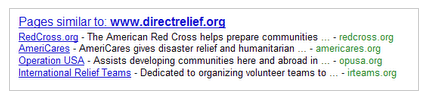
The new feature called “Pages similar ” makes the Google search feature “similar” more prominent and visible on your search results. You can find a box just below the search results page containing list of links that point to, well pages that are similar to the current search results that Google has yielded for your search terms.

The links listed on this Pages similar box are alternative sites that you won’t normally check they don’t directly answer your search query but then again the site may contain contents that would otherwise be useful to your current search.

Google gave the following example illustrating Google’s Pages Similar to feature.

For example, with the recent earthquakes around the world, many of us have been looking for international relief organizations. We knew that Direct Relief International has been actively involved in Haiti, so we started off by searching for [direct relief international]. The first result on the page linked us to the Direct Relief website, where we found many ways to help in Haiti. But what if one wants to support several organizations? If you click the “Similar” link that’s on the same line as the “www.directrelief.org/” URL, you’ll find other nonprofits that are also involved in relief efforts.

We’ve offered a “Similar” feature on results for a while now as a way to discover new, useful sites, but it hasn’t been too visible. Since we’ve been continuously improving this feature and we think it’s really useful, we’re now going to start showing these alternative sites more prominently. Starting this week, for queries where similar sites are likely to be helpful, we’ll display a list of “Pages similar” at the bottom of the results page. For example, this is the list of sites similar to Direct Relief International: