Tuesday, May 11, 2010

Why Google’s Redesign Could Be Good News for Social Marketers

It’s all about the real estate. Google results pages have historically been about simplicity. Any search “options” have been such a little part of the UI that, let’s be honest, hardly anyone knew they were there.

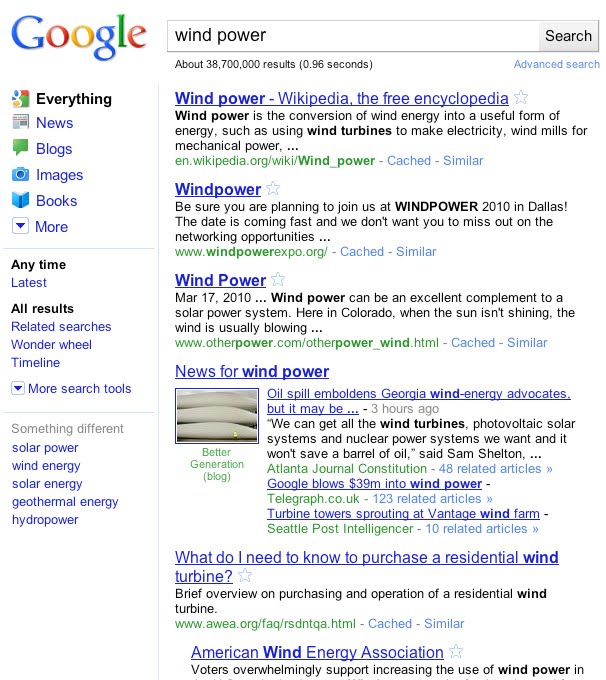
Before now, Google attempted to predict what users wanted by including universal search (such as news, videos, and images) right in the organic results. Most recently, social conversations (blog posts, twitter updates, etc.) have made their way into the SERPS. Today, a clear left navigation gives users quick access to specific vertical search features right from the results pages:

While universal search results had created added opportunities for search marketers to capitalize on SERPs, this latest change favors social marketers. In addition to video, images, maps, and news search; blogs, Forums (Discussions), and Twitter/Buzz like services (Updates) have been given their respective real estate from Google results pages. So if you’re not already involved in these as a part of your internet marketing strategy, you’ve just fallen further behind.

Blogs

While Google blog search is nothing new, this new navigation is sure to generate some increased usage. If you own, run, or write for a blog, that could mean an increase in traffic from Google. If you don’t, it’s probably time you started one…

Freshness of content will also be a consideration for users. While the results are set to sort by “relevance” by default, buttons to sort by date, and/or limit results to the last 10 minutes, hour, day, week, month, and year are easily accessible. The default results, too, even seem to favor the fresh content and include information on how old the post is within the SERP listing. What does this mean for you? Keep blogging…as often as you can.

Updates – Twitter & Google Buzz Search

In December, Google released their “real time search” feature. Tweets were included within results and a full page of real-time tweets was just a click away. Last month, Google added a dynamic archive function which gave users the ability look back at specific days & times or track twitter trends across an entire year. Now, Google has given this search feature a place in their new navigation.

For marketers and content producers, the “Top Links” section of the results is just one more opportunity to spread content by promoting it on Twitter and Google Buzz. While the potential for consistent traffic may not be as appealing as the blog search section, it’s certainly another good reason to make services like twitter and Google Buzz a part of your social media strategy. And if nothing else, it makes for a great tool for ORM or tracking and monitoring social campaigns within the twittersphere.

Discussions – Forum Search

Who says forums are dead? “Discussions” is the final social addition to the new Google navigation and it focuses on forums and answer services like Wiki Answers and Yahoo! Answers. It’s quite useful to users who may be looking for solutions to questions that others might have already posted online. Much like Blog search it’s not a completely new service, but again, this change will likely mean increased usage. So if you own, run, or moderate a forum, this could translate into increased traffic and thus additional activity.

For the rest of social marketers, however, it means allocating more time to participating in industry forums as a part of their social media strategy. Being active within forums and providing answers to common industry related questions on services like Yahoo! Answers can give an individual or brand extra exposure and more importantly: credibility & authority.

Bad news for SEOs?

The down side to Google’s new navigation could be reduced use of the general results. With these extra options easily accessible for users to refine their search, Google has essentially marginalized their search algorithm. The effect could be reduced clicks which could drive traffic down for sites that typically do well in organic results. But as search & social media continue to blend into small parts of a larger entity; marketing strategies will need to adjust. And this change by Google is just one more example.

Friday, May 7, 2010

PPC Magic: 3 Steps To Turning Hundreds Of Keywords Into Millions

Basically, the long tail approach dictates that we not only use high-search volume, general terms, but also load up our accounts with many, many niche terms—the theory being that these tail terms are cheaper due to less competition and also more relevant so they drive higher engagement with users.

I’ve seen campaigns with a few hundred terms perform very well. I’ve also seen campaigns with millions of terms perform poorly. Remember, we test everything in search engine marketing! So, other than the actual logistics of managing a huge list, there really isn’t any drawback to adding and testing many keywords if you think they even have the slightest chance of providing value to your advertiser. I’m going to go out on a limb here and say that for beginners to PPC, try to limit your lists to 10,000 to 20,000 max.

The key is using modifiers

So, how do we take the hundreds of terms we uncovered during our research and turn them into tens of thousands (and maybe even millions) of long tail terms? The secret is with modifiers. For example, if you’re selling used cars, you may take a core term like used car and add buying modifiers so now you have purchase used car, buy used car, shop for used car, etc. As search marketers looking for tail terms, we may combine our core words with multiple modifier lists. For example, if we matched up every term with the dealer’s car brands, we wouldn’t have just purchase used car, but alsopurchase used Saturn, purchase used Ford, purchase used Toyota etc.

Each advertiser will have their own set of modifiers that make sense. However, some common modifier directions include:

Buying cycle. Used for awareness/interest terms, modifiers such as info onor research could be used. For users further down the funnel, buy, shop, purchase and so on also make sense.

Adjectives. If you’re selling broadband service, then description words likefast, speedy, and quick could be important. For banks, it might be performance words such as high yield or safety-conscious words like insured.

Geographical. Lists of cities, towns, states, DMAs, metro areas, etc. If the advertiser is a U.S. based national brand, you may almost always use states and top DMAs as modifiers. Certainly car insurance Omaha should be treated differently than car insurance New York City. Similar geographical modifiers can be used elsewhere in the world.

Here are three steps to using modifiers to build giant keyword lists.

Step #1 – Identify your core terms. If you’ve been through all of the research ideas in this column, you will have already compiled a pretty comprehensive list of keywords from keyword tools, competitor research, and so on. So, you should be able to look through all of the terms and quickly pull out a high level list of core terms. If you’re an online retailer, maybe those core terms are your main categories. Or, if you’re a service company, you will probably have a handful of terms that are used most when people search for your company.

As an example, I’ll use a clothing retailer based in the western region of the U.S. Here is their core term list. Make sure to include plurals and any very common misspellings in the core list.

  • T-shirt
  • T-shirts
  • Jeans
  • Shirt
  • Shirts
  • Dress
  • Dresses

Step #2 – Generate your modifier lists. 5 lists that come to mind for this retailer are:

Sizes: Small, Medium, Large, XL, XXL
Color: Red, Blue, Green, Yellow, Brown, White, Black, Orange
Purchase terms: Buy, Shop, Browse, Purchase, Deal, Cheap, Inexpensive,
Qualifiers: Brand name, Designer, Name Brand, Quality, Chic
Western States: California, Arizona, New Mexico, Nevada, Oregon, Washington, Colorado, Montana

Step #3 – Generate permutations. You can use a permutation tool such as Keyword Lizard or Keyword Combinations to input your various lists. You’re always going to want to use your core terms in combination with modifiers where it makes sense. Here’s a screenshot from the free Keyword Combination tool:

Suddenly, you have tail term lists with designer jeans California, small blue shirt, and inexpensive XL t-shirts. In fact, from your seven core terms and five simple modifier lists, you can easily generate over 200,000 keywords.

Okay, here’s where the magic happens. Check the math: 7 Core Terms X 5 sizes X 8 colors X 7 purchase words X 5 qualifiers X 8 States = 78,400 variations of your core words.

Abracadabra!

Actually, you have more than that. There are keywords that won’t contain every list. So you really add one more modifier per list that is a “blank space”. Once you do that, you get 186,624. Wow! In fact, if you were to add just one more keyword to one of those lists, the total available permutations would be 207,360! You won’t use all of those keywords, especially if you cap them at 3-4 words per keyword phrase. However, chances are you’ll be using many more modifier lists and core terms so the list could grow to millions very easily. Ultimately, you certainly will have plenty of great tail terms to test.

And, if you do it right, you can easily segment the keywords into groups and campaigns. For this example, there could be a “sizes campaign” or a “states campaign.” That way you can address similar words with the most relevant ad text and landing pages. Next week, we’ll dive deeper into campaign and ad group segmentation.

Thursday, May 6, 2010

Google Gives its Search Results Pages the Bing Look

Google has given its main web product, web search a much needed redesign. And while this is a welcome development since it’s been quite awhile since Google has done this to its major service which happens to be the company’s bread and butter, the new look of the search results pages will kind of remind you of Bing though. It’s actually a simpler kind of Bing’s search results pages.

Anyway, putting aside its similarities to Bing’s search results pages, Google’s redesigned search results pages now features a contextually relevant, left-hand navigation which highlights Google’s search verticals including – news, blogs, images, books and more. The new side panel is powered by Google’s search technologies – Universal Search, Search Options Panel and Google Squared.

What’s good about the contents of the left-hand panel is that it is dynamic and changes depending on the type of your search. Through Universal Search technology, the items on the left-hand panel changes and suggests the most relevant genres of results for your query. And you can switch seamlessly to these different types of results. It could also suggest different views on how you want your search results to be displayed or even display the search results together with other related topics.

In addition to the said enhancements to the search results interface, Google has also tweaked the color palette as well as the Google logo – giving the search results pages a modern and still simple look and feel.

The redesigned Google search interface is being rolled out globally today, although I haven’t seen it when I tried visiting Google Search. Have you seen the changes already? How do you like the new design and navigation of the Google Search Results Pages?

Wednesday, May 5, 2010

New Change To The Google SERPs

Google has rolled out a new change to their results pages. This noticeable change is that of brand links for certain search queries.

For example, if you are searching for “baseballs”, you might get links for Rawlings, MacGregor, Ussa, Easton, NFHS, and so forth. (See image below) If you do a search for snowboards (by the way… it’s April 30 and snowing here in Utah) you might get links for Burton, K2, Ride, Forum, and GNU.

I have now seen this on a few occasions and each time the listings tend to appear near the top of the results, just below the ppc paid listings. These “brand links” are not links to the sites of the brands, however, they are links to SERPs for queries that incorporate those brands into them. For example, clicking on “Burton” will take me to a page targeting the search query “burton snowboards”.

google now showing brands in the serps

What this means for ecommerce SEO is a more important focus on optimizing and getting ranked for big for brands. In high school, we used Rawlings and Usssa baseballs. Until I did this search query this morning, I forgot that we used the Usssa balls. If I was going to purchase some baseballs, I would probably click on one of the two brands. If you were a dealer of Rawlings baseballs, optimized for Rawlings baseballs, and showed up high in the SERPs, you might have just got my business.

It is unclear whether these results have been rolled out on a mass scale or if they are just part of a limited test. However, many of the searches I performed this morning had the brand results. Also, no one really knows how to get your brand listed in these suggestions. It is assumed that it is related to how frequent theses brands are searched for in relation to their respective items.

I’ll tell you this, when I do keyword research going forward, I will be paying close attention to the associated brands with particular search queries to see if there are any “favored” brands that I can optimize for.

Tuesday, May 4, 2010

55 Quick Search Engine Optimization Tips

Everyone loves a good tip, right? Here are 55 quick tips for search engine optimization. Most folks with some web design and beginner SEO knowledge should be able to take these to the bank without any problem.

1. If you absolutely MUST use Java script drop down menus, image maps or image links, be sure to put text links somewhere on the page for the spiders to follow.

2. Content is king, so be sure to have good, well-written and unique content that will focus on your primary keyword or keyword phrase.

3. If content is king, then links are queen. Build a network of quality backlinks using your keyword phrase as the link. Remember, if there is no good, logical reason for that site to link to you, you don’t want the link.

4. Don’t be obsessed with PageRank. It is just one isty bitsy part of the ranking algorithm. A site with lower PR can actually outrank one with a higher PR.

5. Be sure you have a unique, keyword focused Title tag on every page of your site. And, if you MUST have the name of your company in it, put it at the end. Unless you are a major brand name that is a household name, your business name will probably get few searches.

6. Fresh content can help improve your rankings. Add new, useful content to your pages on a regular basis. Content freshness adds relevancy to your site in the eyes of the search engines.

7. Be sure links to your site and within your site use your keyword phrase. In other words, if your target is “blue widgets” then link to “blue widgets” instead of a “Click here” link.

8. Focus on search phrases, not single keywords, and put your location in your text (“our Palm Springs store” not “our store”) to help you get found in local searches.

9. Don’t design your web site without considering SEO. Make sure your web designer understands your expectations for organic SEO. Doing a retrofit on your shiny new Flash-based site after it is built won’t cut it. Spiders can crawl text, not Flash or images.

10. Use keywords and keyword phrases appropriately in text links, image ALT attributes and even your domain name.

11. Check for canonicalization issues – www and non-www domains. Decide which you want to use and 301 redirect the other to it. In other words, if http://www.domain.com is your preference, then http://domain.com should redirect to it.

12. Check the link to your home page throughout your site. Is index.html appended to your domain name? If so, you’re splitting your links. Outside links go to http://www.domain.com and internal links go to http://www.domain.com/index.html.

Ditch the index.html or default.php or whatever the page is and always link back to your domain.

13. Frames, Flash and AJAX all share a common problem – you can’t link to a single page. It’s either all or nothing. Don’t use Frames at all and use Flash and AJAX sparingly for best SEO results.

14. Your URL file extension doesn’t matter. You can use .html, .htm, .asp, .php, etc. and it won’t make a difference as far as your SEO is concerned.

15. Got a new web site you want spidered? Submitting through Google’s regular submission form can take weeks. The quickest way to get your site spidered is by getting a link to it through another quality site.

16. If your site content doesn’t change often, your site needs a blog because search spiders like fresh text. Blog at least three time a week with good, fresh content to feed those little crawlers.

17. When link building, think quality, not quantity. One single, good, authoritative link can do a lot more for you than a dozen poor quality links, which can actually hurt you.

18. Search engines want natural language content. Don’t try to stuff your text with keywords. It won’t work. Search engines look at how many times a term is in your content and if it is abnormally high, will count this against you rather than for you.

19. Not only should your links use keyword anchor text, but the text around the links should also be related to your keywords. In other words, surround the link with descriptive text.

20. If you are on a shared server, do a blacklist check to be sure you’re not on a proxy with a spammer or banned site. Their negative notoriety could affect your own rankings.

21. Be aware that by using services that block domain ownership information when you register a domain, Google might see you as a potential spammer.

22. When optimizing your blog posts, optimize your post title tag independently from your blog title.

23. The bottom line in SEO is Text, Links, Popularity and Reputation.

24. Make sure your site is easy to use. This can influence your link building ability and popularity and, thus, your ranking.

25. Give link love, Get link love. Don’t be stingy with linking out. That will encourage others to link to you.

26. Search engines like unique content that is also quality content. There can be a difference between unique content and quality content. Make sure your content is both.

27. If you absolutely MUST have your main page as a splash page that is all Flash or one big image, place text and navigation links below the fold.

28. Some of your most valuable links might not appear in web sites at all but be in the form of e-mail communications such as newletters and zines.

29. You get NOTHING from paid links except a few clicks unless the links are embedded in body text and NOT obvious sponsored links.

30. Links from .edu domains are given nice weight by the search engines. Run a search for possible non-profit .edu sites that are looking for sponsors.

31. Give them something to talk about. Linkbaiting is simply good content.

32. Give each page a focus on a single keyword phrase. Don’t try to optimize the page for several keywords at once.

33. SEO is useless if you have a weak or non-existent call to action. Make sure your call to action is clear and present.

34. SEO is not a one-shot process. The search landscape changes daily, so expect to work on your optimization daily.

35. Cater to influential bloggers and authority sites who might link to you, your images, videos, podcasts, etc. or ask to reprint your content.

36. Get the owner or CEO blogging. It’s priceless! CEO influence on a blog is incredible as this is the VOICE of the company. Response from the owner to reader comments will cause your credibility to skyrocket!

37. Optimize the text in your RSS feed just like you should with your posts and web pages. Use descriptive, keyword rich text in your title and description.

38. Use captions with your images. As with newspaper photos, place keyword rich captions with your images.

39. Pay attention to the context surrounding your images. Images can rank based on text that surrounds them on the page. Pay attention to keyword text, headings, etc.

40. You’re better off letting your site pages be found naturally by the crawler. Good global navigation and linking will serve you much better than relying only on an XML Sitemap.

41. There are two ways to NOT see Google’s Personalized Search results:

(1) Log out of Google

(2) Append &pws=0 to the end of your search URL in the search bar

42. Links (especially deep links) from a high PageRank site are golden. High PR indicates high trust, so the back links will carry more weight.

43. Use absolute links. Not only will it make your on-site link navigation less prone to problems (like links to and from https pages), but if someone scrapes your content, you’ll get backlink juice out of it.

44. See if your hosting company offers “Sticky” forwarding when moving to a new domain. This allows temporary forwarding to the new domain from the old, retaining the new URL in the address bar so that users can gradually get used to the new URL.

45. Understand social marketing. It IS part of SEO. The more you understand about sites like Digg, Yelp, del.icio.us, Facebook, etc., the better you will be able to compete in search.

46. To get the best chance for your videos to be found by the crawlers, create a video sitemap and list it in your Google Webmaster Central account.

47. Videos that show up in Google blended search results don’t just come from YouTube. Be sure to submit your videos to other quality video sites like Metacafe, AOL, MSN and Yahoo to name a few.

48. Surround video content on your pages with keyword rich text. The search engines look at surrounding content to define the usefulness of the video for the query.

49. Use the words “image” or “picture” in your photo ALT descriptions and captions. A lot of searches are for a keyword plus one of those words.

50. Enable “Enhanced image search” in your Google Webmaster Central account. Images are a big part of the new blended search results, so allowing Google to find your photos will help your SEO efforts.

51. Add viral components to your web site or blog – reviews, sharing functions, ratings, visitor comments, etc.

52. Broaden your range of services to include video, podcasts, news, social content and so forth. SEO is not about 10 blue links anymore.

53. When considering a link purchase or exchange, check the cache date of the page where your link will be located in Google. Search for “cache:URL” where you substitute “URL” for the actual page. The newer the cache date the better. If the page isn’t there or the cache date is more than an month old, the page isn’t worth much.

54. If you have pages on your site that are very similar (you are concerned about duplicate content issues) and you want to be sure the correct one is included in the search engines, place the URL of your preferred page in your sitemaps.

55. Check your server headers. Search for “check server header” to find free online tools for this. You want to be sure your URLs report a “200 OK” status or “301 Moved Permanently ” for redirects. If the status shows anything else, check to be sure your URLs are set up properly and used consistently throughout your site.

Written By: SEJ

Monday, May 3, 2010

How To Use E-mail To Benefit SEO

Most of you reading this headline will probably think I’m crazy. We all know that search engines do not crawl or index e-mail. What we forget is that you do have the option to view a copy of the e-mail you receive in a browser. Usually this is reserved for e-mails that are sent from brands to people that have registered for a newsletter, etc. This copy of the e-mail is usually just a simple HTML page that can be crawled and indexed by the search engines, and, if you play your cards right, could benefit your SEO efforts.

If you’re a Marketer, most of the E-mail you send out to your audience will provide the option to view the e-mail in a browser, usually identified at the top of the email with something like “If this message is not displaying properly, click here to launch your browser.” When clicked, your browser opens up the same version of the e-mail as a static HTML page. Typically this e-mail has links back to your web site for additional information or other calls to action, which can be used to pass link equity for SEO purposes.

There may be certain content or emails that you don’t want to have crawled and indexed by the engines. In this case, simply format your robot.txt file accordingly. Here’s some tips & examples on how to go about this:

  • Put all of the HTML versions of the e-mail that you do want to have crawled into a directory. In this example, I’ve named the directory “Google_Email”.
  • Put all of the HTML versions of the e-mail that you don’t want to have crawled (due to sensitive content) into a directory. In this example, I’ve named the directory “No_Email”.
  • Update your robot.txt file to disallow the “No_Email” directory:

User-agent: *

Disallow: /No_Email

  • Make sure that all of the HTML versions in the “Google_Email” directory are utilizing SEO Best Practices – Optimized Headlines, Body Copy, Links Using Keywords and pointing to your site’s targeted SEO pages.
  • To further increase links and traffic to your targeted SEO pages, add a “Share” option to the e-Mail that links to your site’s targeted SEO pages, thereby creating the opportunity to increase link equity naturally.
  • If you cannot add body text links in the e-mail, create a “Quick Links” area in the right panel to offer links to your site’s targeted SEO pages.
  • Add these E-Mails (the actual URLs) to your XML Sitemap.
  • If possible, setup your web metrics to see what impact these e-mails have on your SEO performance.

It’s that simple!

Enhance Google Adwords Tool with Keyword Tool Supercharger

Keyword Tool Supercharger is a great tool developed by GeekLad. It means to provide more competition and keyword analysis data for a widely-used free keyword research tool – Google Adwords Tool.

It can be installed as Google Chrome Extension or as a browser bookmarklet –KWT Supercharger (FireFox: just drag it to your browser bookmarks toolbar).

Now give it a try!

Run a keyword suggestions search at Google Adwords Tool and click the bookmarklet. The first thing you’ll notice is an extra options box added to the regular Adwords tool interface.

The box contains the following options:

Keyword tool supercharger

The box allows to filter the search terms in various ways you may (and will!) find useful:

  • Desired Daily Volume: The number of daily searches for the keywords. Higher is better.
  • Desired Competition: The number of websites containing the keywords. Lower is better.
  • Desired Supply/Demand Ratio: The # of competing sites/# of daily searches. Lower is better, a ratio less than 1 is ideal.
  • Required words (comma or space separated): Words/phrases you wish to see appear within the results. These need to be separated by commas. You can also prefix a word/phrase with a minus (-) to specify words you do not want to appear in the results.
  • Exact search: Whether or not you want the competition data to be based on searches of the exact phrase (the keyword phrases are searched with quotes). By default, this is enabled.
  • Filter on SEO Criteria: When you click this, only rows that match the criteria above will be displayed.
  • Show All/Update Display: This will display all results (including those that do not match the criteria above).
  • Reload Competition Data: This will reset and reload all of the competition data. This may be necessary if you’ve selected a new choice for the Exact search option.

While this all seems pretty straightforward, let’s look into some of the options in more detail:

Search within your keyword list

Or, in other words, filter your keyword list by one (or more) term you want to see in the key phrase.

For example, first run the keyword search for [diabetic] and then filter the list by two words [diet] and [diets]. You thus see a clean keyword list containing your core term [diabetic] and the extra word you are currently interested in [diet(s)]:

Search within your keyword list

Get an idea of the “supply”

While the “search volume” data gives you an idea of each key term “demand”, the tool offers a way to research the supply: by default, it uses Bing API to check how many search results each term will generate if you search Bing for the exact match. Bing data may seem not exactly reliable but it can be used to compare.

The tool also breaks down monthly searches by average daily search, and then builds a supply/demand ratio based on the daily searches divided by the total number of results for the keyword:

Daily search volume / total number of search results = supply/demand ratio

(The lower the ratio, the better the odds you’ll receive some organic traffic if you use those keywords on your page.)

The additional keyword analysis data is provided in three new columns in the display:

Keyword tool supercharger

You can also query Google search results numbers but, unlike with Bing, you won’t be able to do that in bulk. Instead, you’ll have to click each Bing number for the tool to query and return Google result number. The supply/demand ratio will also be re-calculated once you query Google:

Keyword tool supercharger

A few things I’d like to be added to the tool:

  • The sorting option for the added columns;
  • The ability to enable competition query for the filtered-by-the-keyword list (currently, when I filter the list by a keyword and then push “Reload Competition Data”, the keyword filter seems to get disabled)

All in all, I found the tool very usable and useful. You may want to give it a try and let me know what you think!

From SEJ